Awk tutorial and practical examples.
This article is a partial translation of Awk command tutorial in linux/unix with examples and use cases
What is AWK?
AWK is a text processing tool.
The simplest and most common use case is extracting the Nth column of text, for example:
# file data
1 Tony 18
2 Jenny 20
$ awk '{ print $2 }' data
Tony
JennyAWK is named after the initials of its three creators: Alfred Aho, Peter Weinberger, and Brian Kernighan.
AWK has a built-in scripting language to help process data. This language supports variables, functions, user-defined functions, and many logical operators. With this scripting language, awk can handle a wide range of practical tasks.
Using AWK
Basic Format
awk [options] 'pattern{ commands } file'
Full Format
awk [-F|-f|-v] '
BEGIN{ commands }
pattern{ commands }
END{ commands }' file
Options
-
-F: specify the field separator-F'[:#|]': multiple separators can be defined -
-f: specify a script file -
-v: define a variablevar=value
Syntax
pattern { action }
Actions are similar to other scripting languages, including basic keywords like if, for, while, etc.
              if( expression ) statement [ else statement ]
              while( expression ) statement
              for( expression ; expression ; expression ) statement
              for( var in array ) statement
              do statement while( expression )
              break
              continue
              { [ statement ... ] }
              expression              # commonly var = expression
              print [ expression-list ] [ > expression ]
              printf format [ , expression-list ] [ > expression ]
              return [ expression ]
              next                    # skip remaining patterns on this input line
              nextfile                # skip rest of this file, open next, start at top
              delete array[ expression ]# delete an array element
              delete array            # delete all elements of array
              exit [ expression ]     # exit immediately; status is expression
User-Defined Functions
Awk supports user-defined functions, typically placed before the BEGIN block.
function foo(a, b, c) { ...; return x }
AWK Execution Flow
An awk script typically consists of three parts: BEGIN, BODY, and END.
All three parts are optional.
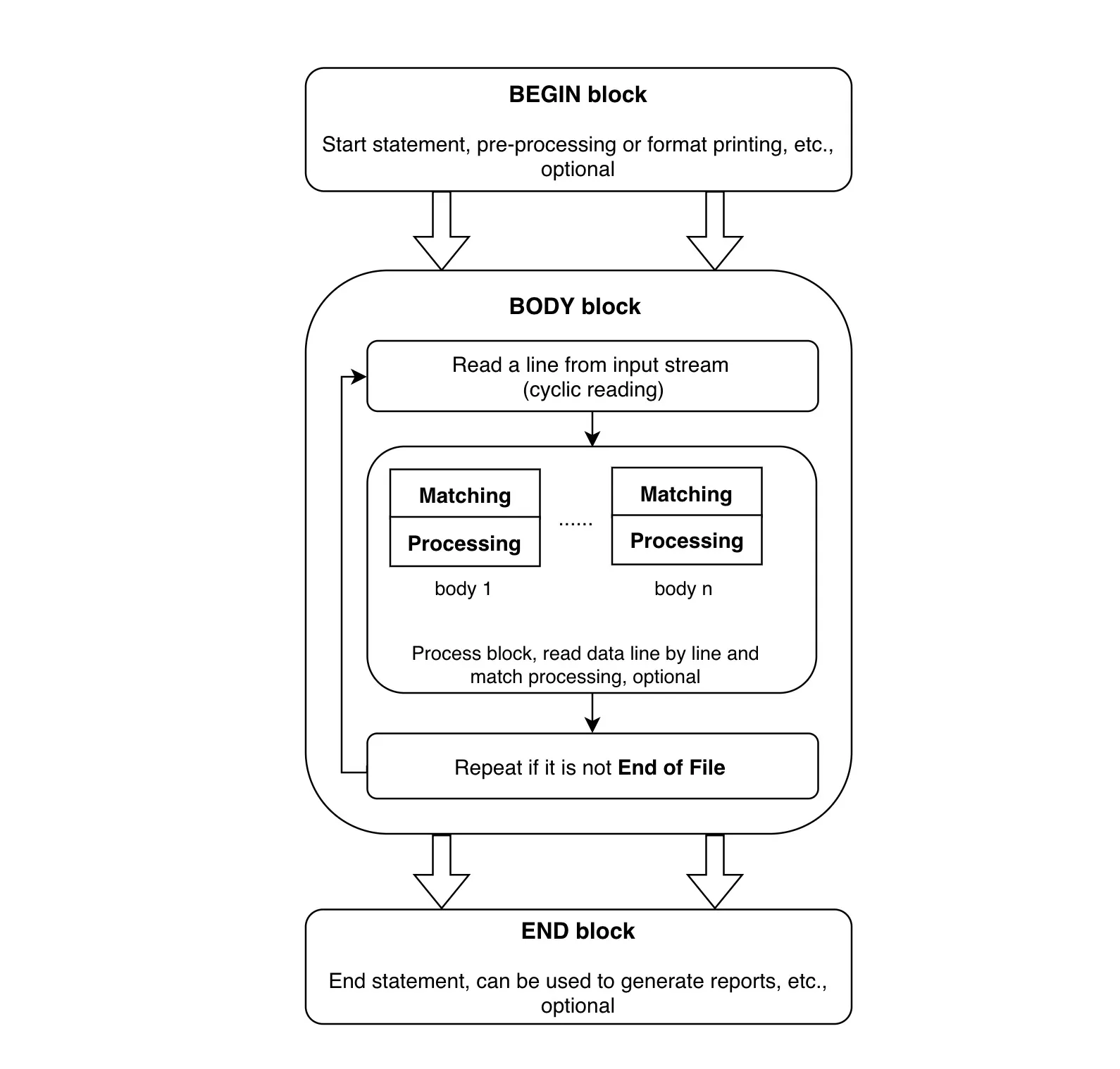
- Step 1: Execute commands in the
BEGINblock. - Step 2: Read one line at a time from stdin or a file, execute matching commands, and repeat until input is exhausted.
- Step 3: When the file ends, execute commands in the
ENDblock.
BEGIN runs before any input is read. It’s typically used to initialize variables and print output headers or other auxiliary information.
END runs after all input has been read. It’s used to print summary or statistical information.
BODY contains the main processing commands. If an awk command has no BODY section, it defaults to {print} — outputting each record in its entirety.
Variables
$0: the entire line$1: the 1st field of each lineNF: number of fieldsNR: current line numberFNR: similar toNR, but resets per file when processing multiple filesFS: field separatorRS: record separator (default: one line per record)ARGC: argument countARGV: argument arrayENVIRON: environment variable arrayOFS: output field separator (default: space)ORS: output record separator (default: newline)
Operators
+ - * / % ^ ! ++ -- += -= *= /= %= ^= > >= < <= == != ?: ~: matches (contains), fuzzy comparison!~: does not match (does not contain), fuzzy comparison==: equals, exact comparison!=: not equal, exact comparison
The difference between these matching operators:
~checks whether a string contains a substring==checks whether two strings are exactly identical
Arrays
array[index]=value
Arrays don’t need to be declared before use, and the index can be any string — similar to a dictionary. If the index is a string, use double quotes.
Awk arrays don’t support multi-dimensional arrays, but you can simulate them via the index. Note that double quotes aren’t needed here:
array[1,1]=0
Example
The following example shows the original file locations of applications under /usr/bin:
$ ls -l /usr/bin | awk '
    BEGIN {
        print "Directory Report"
        print "================"
    }

    NF > 9 {
        print $9, "is a symbolic link to", $NF
    }

    END {
        print "============="
        print "End Of Report"
    }
'
Here, NF > 9 means only lines with more than 9 fields will execute the BODY commands.
Built-in Functions
Arithmetic functions: exp, log, sqrt, sin, cos, atan2
Other built-in functions:
rand: get a random decimal between 0 and 1srand: set the random seedint: truncate to the integer partsubstr(string, position, length)/substr(string, position): extract a substringindex(s, t): position of charactert, returns 0 if not foundmatch(s, r): position of the match for regexrsplit(source, des, delimiter): split a string by delimiter into arraydessub(r, t, s): replace the first match ofrwitht,sdefaults to$0gsub(r, t, s): likesub, but replaces all matchessprintf(fmt, expr, ...): format data into a stringsystem(cmd): execute a command and return the status codetolower(str): return the lowercase version of a stringtoupper(str): return the uppercase version of a string
Practical Examples
Group By Count
We usually use SQL’s GROUP BY + COUNT to aggregate and count data. Awk can do this just as easily.
Sample data:
id,name,sex
1,Tony,male
2,Jenny,female
3,Jack,male
Count by gender:
awk -F, '
BEGIN {
  print "---------"
  print "sex total"
}

NR > 1 {
  counter[$3]++
}

END {
  print "male: ", counter["male"];
  print "female: ", counter["female"]
}' data
Matching Text Within a Range
Using the data above as an example, suppose this data is embedded in a much longer text:
...
UserData
id,name,sex
xxx
final: xxx
...
If the data is bounded by clear markers, we can use range pattern matching:
/UserData/, /final/ { counter[$3]++ }